Imagine your company is opening offices in Delhi, Karnataka and Maharashtra. Until now, you had to start three GST registration applications and enter the same promoter, signatory and business details three times. GSTN has now introduced a Multistate Registration facility to reduce this repetition.
The new facility lets eligible applicants begin registrations in multiple States or Union Territories through one Master Temporary Reference Number (Master TRN). But it does not create one GSTIN for the whole country. Get your GST Registration for Multiple states with Startup Movers.
|
Particular |
New position |
|
Launch date |
1 October 2026 |
|
Who can currently use it? |
Normal Taxpayers |
|
PAN requirement |
All selected registrations must be under the same PAN |
|
Common reference number |
One Master TRN |
|
Master TRN submission limit |
15 days |
|
After common details are submitted |
A separate TRN is generated for every selected State or UT |
|
Final GST registration |
Separate GSTIN for every approved State or UT application |
|
Main benefit |
Common information is entered once instead of repeatedly |
The application process has been combined at the beginning. The State-wise registrations themselves have not been combined.
Earlier, a business applying for GST registration in three States had to begin three separate applications. Even when the PAN, promoters, authorised signatory and business activities were the same, the common details had to be entered repeatedly.
Under the new facility, the applicant can select all required States or UTs from the Multistate Registration tab on the GST Portal homepage. The system then generates one Master TRN for entering the details that are common to every application.
The facility is currently available only to Normal Taxpayers seeking registration in more than one State or UT under the same PAN. The taxpayer category shown in the application is therefore fixed as “Taxpayer.”
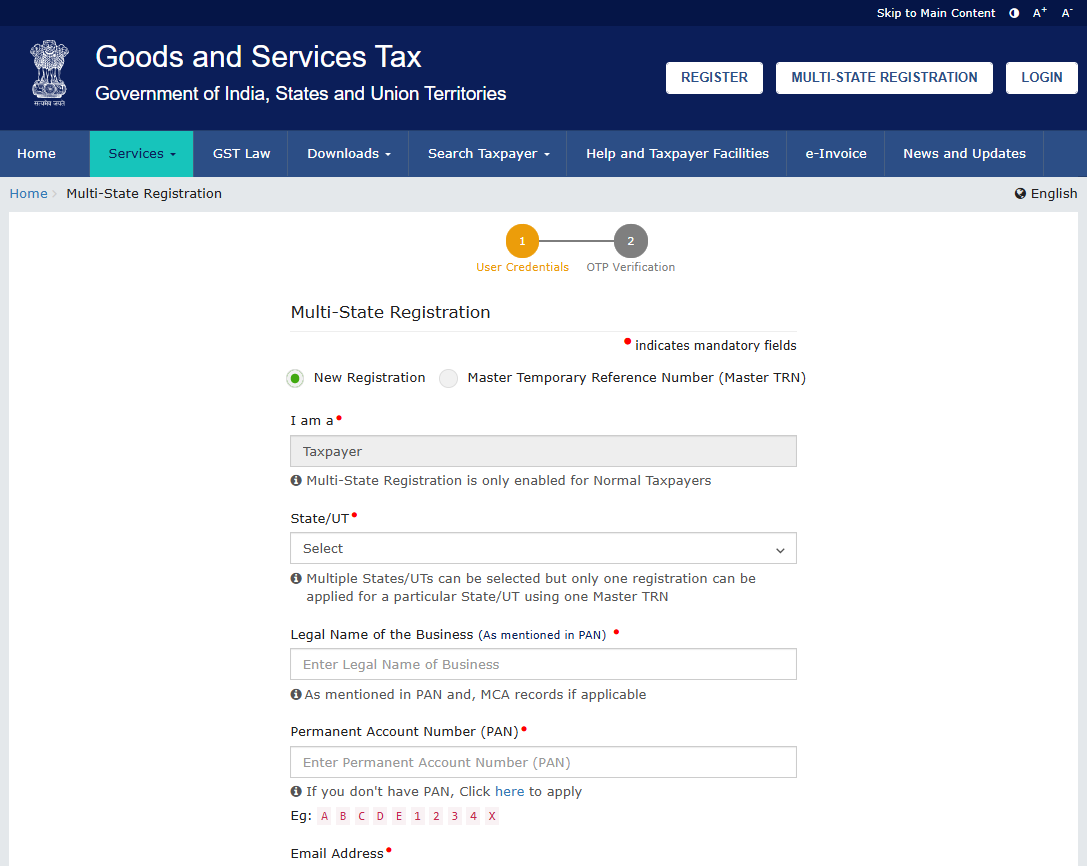
A Master TRN is a common Temporary Reference Number generated for the States or UTs selected by the applicant. It is used to provide the Common Registration Information (CRI), including:
The Master TRN must be submitted within 15 days. Once the CRI is submitted, the portal generates an individual TRN for each selected State or UT.
A State-specific TRN is the reference number used to complete an individual State or UT registration application. The common information entered through the Master TRN is automatically filled in these applications and remains editable. The applicant must then add the information that changes from one State to another.
|
Information entered once through Master TRN |
Information completed for each State or UT |
|
Business details |
Principal Place of Business |
|
Promoter or partner details |
Additional Place of Business, if any |
|
Authorised signatory |
State-specific information |
|
Authorised representative |
Address and premises documents |
|
Goods and services |
Aadhaar authentication |
To complete a new GST Registration in multiple state, one can follow these steps:
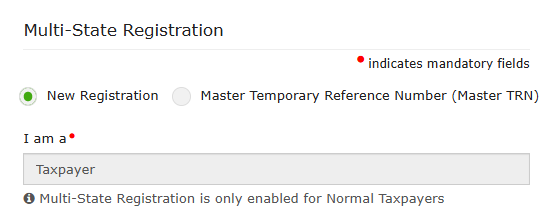
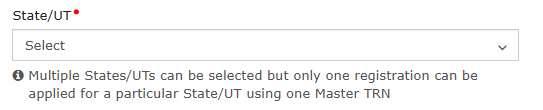

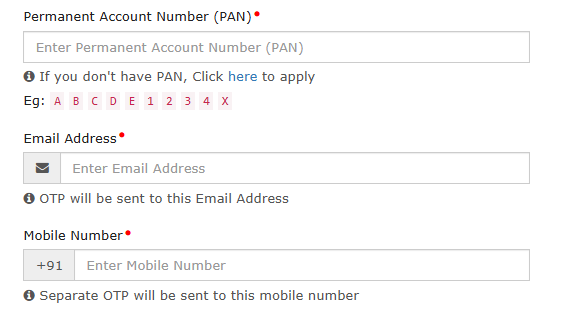
Note: The portal currently indicates that one Master TRN can be used for only one registration in each selected State or UT.
Too many steps to get GST Registration for Multi-State? Connect with Startup Movers and make the process smooth and hasslefree.
Let’s understand the need of multi-state gst registration, Suppose a company operating under one PAN needs GST registration in Delhi, Karnataka and Maharashtra.
Earlier, the company had to begin three separate applications and repeatedly enter the same business, promoter, authorised signatory and goods or services details. This made the registration process longer and increased the possibility of inconsistent information or errors.
The new Multistate Registration facility solves this problem through one Master TRN. The company can select all three States and enter its common information only once. After the Master TRN is submitted, the GST Portal generates:
The company then completes the State-specific information, such as its local office, warehouse or other place-of-business details, in each application. Once approved, it receives a separate GSTIN for every State.
Therefore, the new facility simplifies the application process but does not create one GSTIN for the entire country.
One PAN → One Master TRN → Three State-specific TRNs → Three GSTINs
The biggest misunderstanding would be to treat the Master TRN as a single national GST registration. GST continues to be State-based. A registration held in one State does not automatically cover establishments that require registration in another State.
Here are some key points that that are not changes after the Master TRN update:
1. Every State still issues a separate GSTIN: The Master TRN only simplifies common data entry. It does not replace the individual State applications or merge them into one registration.
2. Each registration is treated separately: Under Section 25 of the CGST Act, registrations obtained by the same person in different States or UTs are treated as distinct persons for GST purposes.
In simple words, the business may have one PAN, but each GSTIN is treated as a separate registered person under GST.
3. Returns and tax payments remain State-wise: After registration, each GSTIN may have its own:
The new facility saves effort during registration. It does not create one combined GST return for all States.
4. Input Tax Credit does not automatically move between GSTINs: Input Tax Credit available under one State GSTIN cannot simply be used to pay the GST liability of another State GSTIN. Businesses receiving common services for multiple GST registrations may need to assess the applicable ISD or cross-charge treatment.
5. State-specific documents and verification are still required: Every State application must contain its own place-of-business details and supporting documents. Aadhaar authentication, queries, physical verification or approval may also be handled separately for each application, as applicable.
|
What becomes easier? |
What remains separate? |
|
Selecting multiple States |
State-wise registration applications |
|
Entering common information |
Principal and additional places of business |
|
Managing one initial reference |
Individual State TRNs |
|
Reusing promoter and signatory details |
Aadhaar authentication and verification |
|
Starting applications together |
GSTIN, returns, payments and compliance |
The facility can currently be used by a Normal Taxpayer applying for registration in multiple States or UTs under the same PAN.
It may be useful for:
However, operating nationally or selling to customers in another State does not automatically mean that registration is required in every customer’s State. The requirement depends on where the business makes supplies, maintains establishments or stock, and how the GST registration provisions apply to its activities.
Applicants should keep the following documents ready for Multi-state GST Registration:
The exact documents can differ according to the constitution of the business, ownership of the premises, taxpayer type and State-specific fields displayed on the portal.
The Multistate Registration facility removes one major headache for expanding businesses: repeatedly entering the same information while starting GST applications in different States.
But the legal result remains the same. One Master TRN makes registration easier; it does not create one GSTIN, one return or one compliance system for all States. Need help determining where your business requires GST registration? Connect with Startup Movers and our expert will guide you through-out the process.
Disclaimer: This content is published for informational and educational purposes only and should not be considered legal, tax, financial, or professional advice. Please consult a qualified professional before making any financial or business decisions. Startup Movers shall not be liable for any loss or damage arising from reliance on this content.

Published Date: 05 Oct 26







© 2026 Startup Movers All rights reserved. | Designed By : The Night Marketer




Leave a Comment
Comments
No comments yet.
RECENT ARTICLES
CBDT Extends ITR and Tax Audit Due Dates for AY 2026-27
Documents Required for Private Limited Company: The Complete 2026 Checklist
E-Commerce Compliance in India: GST, TDS & TCS
Understand the Different Types of Business Registration in India
Startup India Scheme: Top Government Schemes and Financial Incentives for Entrepreneurs
EPFO Wage Ceiling Raised from ₹15,000 to ₹25,000: Will Your PF Deduction and Take-Home Salary Change?
Depreciation Under AS 10 and Intangible Assets Under AS 26
GST Compliance for Online Food Sellers: Your Comprehensive Guide